Safe and Ethical Job Application Automation: Evasion Engineering
A deep technical guide to implementing job application automation tools. Learn how to bypass bot detection filters (Cloudflare, Akamai), avoid account suspension, and adhere to ethical request limits.
Dmitry Freeman
HR-Tech Architect & ATS Integration Specialist
Dmitry Freeman is an HR-Tech platform engineer and career optimization consultant. He focuses on RAG-driven CV tailoring, ATS matching algorithms, automated application pipeline engineering, and technical interview simulation tech.
Job hunting for Senior specialists in the era of globalization has turned into a numbers game. To secure a single high-quality interview, candidates sometimes have to send up to 100–200 applications. Doing this manually is an enormous waste of time that could be spent preparing for technical rounds or resting.
A logical solution for engineers is application automation. Writing scripts to parse vacancies by criteria and automatically submit resumes through forms on LinkedIn, Indeed, or Glassdoor allows you to automate the routine.
However, modern job boards are protected by advanced bot prevention systems (Cloudflare, Akamai, PerimeterX). If your script is written naively, it will be blocked within the first 5 minutes, and your personal account on the platform will receive a lifetime ban.
In this guide, we will break down the physics of bot detection in detail, construct a resilient automation stack using Playwright with stealth features, and discuss the ethical boundaries of job application automation.
1. How Job Boards Detect Automation: The Physics of Evasion
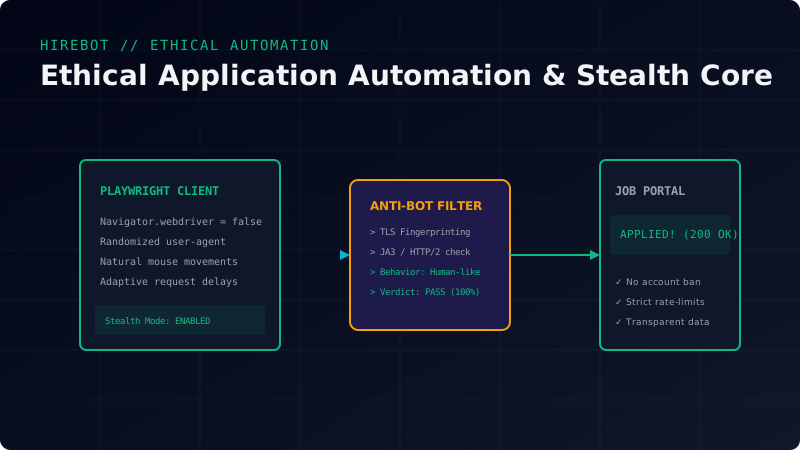
Bot prevention on modern sites works on three independent levels:
1. Browser Fingerprinting
When loading a page, anti-bot scripts analyze hundreds of variables in your browser:
- The
navigator.webdrivervariable (which isfalsein a regular browser, but gets set totrueas soon as you run Puppeteer or Playwright without stealth plugins). - WebGL support and Canvas rendering (reflecting unique characteristics of your graphics card).
- Installed plugins, system fonts, locale, and timezone settings.
- The presence of global Chrome variables (
window.chrome).
2. Network Fingerprinting
The system analyzes not just what you send, but how you send it:
- JA3 Fingerprint: Analysis of the TLS Client Hello packet (supported ciphers, extensions, and elliptic curve versions). The signatures of standard network libraries (like Python’s
requestsor Node’saxios) are completely different from those of real web browsers. - HTTP/2 Settings: The order and weights of frames when establishing an HTTP/2 connection.
- IP Reputation: If you connect from AWS servers or cheap hosting providers, the anti-bot wall will instantly block the request or issue an impossible CAPTCHA, because regular users do not browse the web from cloud datacenters.
3. Behavioral Analysis
If a bot lands on a job page and clicks “Apply” exactly 0.1 seconds after the page renders, executing a perfectly linear mouse movement to the button coordinates, it is flagged as automation. Humans move the mouse along complex curves with acceleration and deceleration, and pause to read the text.
2. Implementing a Stealth Stack with Node.js and Playwright
To create resilient automation, we will need:
@playwright/testorplaywright-extra— for browser orchestration.puppeteer-extra-plugin-stealth— a plugin that dynamically spoofs hundreds of browser variables (includingnavigator.webdriver), masking the headless browser as a standard Chrome instance.
Install the dependencies:
npm install playwright playwright-extra puppeteer-extra-plugin-stealthLet’s write a safe automation script stealth_applier.js:
const { chromium } = require('playwright-extra');
const stealth = require('puppeteer-extra-plugin-stealth')();

// Register the stealth plugin
chromium.use(stealth);

async function applyToJob(jobUrl, resumePath) {
  console.log(`[*] Starting stealth session for: ${jobUrl}`);

  // Launch real Chrome (not default Chromium) to have a valid TLS fingerprint
  const browser = await chromium.launch({
    headless: false, // Headful mode is highly recommended to minimize detection
    executablePath: '/usr/bin/google-chrome-stable', // Path to your real Chrome binary
    args: [
      '--disable-blink-features=AutomationControlled', // Hides the automation status
      '--no-sandbox',
    ]
  });

  const context = await browser.newContext({
    userAgent: 'Mozilla/5.0 (Windows NT 10.0; Win64; x64) AppleWebKit/537.36 (KHTML, like Gecko) Chrome/120.0.0.0 Safari/537.36',
    viewport: { width: 1280, height: 800 },
    locale: 'en-US',
    timezoneId: 'America/New_York'
  });

  const page = await context.newPage();

  try {
    // Step 1: Navigate to the job page with human-like delay simulation
    await page.goto(jobUrl, { waitUntil: 'networkidle' });
    console.log('[+] Page loaded. Simulating reading behavior...');

    // Emulate human reading behavior (random scroll)
    await page.evaluate(() => window.scrollBy(0, 400));
    await page.waitForTimeout(Math.random() * 2000 + 1000); // 1-3 seconds pause

    await page.evaluate(() => window.scrollBy(0, 300));
    await page.waitForTimeout(Math.random() * 1500 + 500);

    // Step 2: Safely click the apply button
    // Find the button by text (in reality, the selector depends on the platform)
    const applyButton = await page.locator('button:has-text("Apply Now"), button:has-text("Easy Apply")');

    if (await applyButton.isVisible()) {
      // Emulate smooth mouse movement to the element before clicking
      const box = await applyButton.boundingBox();
      if (box) {
        const targetX = box.x + box.width / 2 + (Math.random() * 10 - 5);
        const targetY = box.y + box.height / 2 + (Math.random() * 10 - 5);

        await page.mouse.move(targetX, targetY, { steps: 25 }); // 25 steps for smoothness
        await page.waitForTimeout(300);
        await page.mouse.down();
        await page.waitForTimeout(100);
        await page.mouse.up();
        console.log('[+] Successfully clicked the apply button.');
      }
    } else {
      console.log('[-] Apply button not found on this page.');
    }

    // Further form filling goes here...

  } catch (error) {
    console.error(`[-] Error during automation: ${error}`);
  } finally {
    await browser.close();
    console.log('[*] Session closed.');
  }
}

// Running example
// applyToJob('https://example-job-board.com/vacancy/12345', 'my_resume.pdf');
3. Ethical Guidelines for Job Application Automation
Automation is a superpower, and it must be used responsibly. Endless, chaotic mass mailing of resumes to every vacancy in sight harms both you and the professional community:
- It overburdens recruiters with terabytes of irrelevant resumes. As a result, companies implement even stricter, more non-transparent ATS filters, which hurts honest candidates.
- It devalues your personal brand. If a recruiter at a major company notices that your bot has applied to 20 vacancies in the company simultaneously (from Node.js junior to SRE architect), your profile will be placed in a permanent blocklist.
Rules of Ethical Automation:
- Strict Relevance: Your bot must ONLY apply to vacancies that match your real experience by at least 75%. Perform automatic semantic scoring before applying (as described in our article on AI Agents).
- Tight Daily Limits: Do not send more than 20–30 applications per day. This volume is absolutely sufficient to stably receive 2-3 high-quality interview invitations per week.
- Randomized Timing: Intervals between applications should be measured in hours, not seconds. The bot should run during standard working hours of the target vacancy’s timezone, imitating natural candidate activity.
Conclusion
Automating routine processes is a critical skill for a modern engineer, and job hunting is no exception. Using Playwright-based stealth technologies protects your sessions from technical blocks, but strict adherence to ethical limits and focusing on the high quality of every single application will turn your script into an elite tool for building your career.
Try the free AI CV Analyzer — score your resume against real ATS criteria and see keyword gaps in seconds.
Need to check your own CV?
Get instant AI-powered analysis of your resume. Free, no account needed.
Try AI CV Analyzer →Related Posts
The Mathematics of ATS Grading and Scoring Algorithms
Behind the curtain of Applicant Tracking Systems: TF-IDF formulations, entity recognition, and parsing heuristics that make or break candidate rankings.
Resume ATS Compatibility Engineering: Under the Hood of Parsing Engines
A deep technical breakdown of how modern Applicant Tracking Systems (ATS) work. Discover how algorithms tokenize PDFs, calculate keyword weights (TF-IDF), and why beautiful multi-column designs destroy your parse rates.
Rate-Limiting and Circuit-Breaking Distributed Web Scrapers
Advanced scraping architecture: setting up Redis-Sentinel limits, rotating residential proxy pools, and bypass strategies for robust, concurrent job parsing.
Algorithms of Automated Resume Tailoring: Under the Hood of RAG-Based Customization
A deep technical dive into RAG (Retrieval-Augmented Generation) architectures for hyper-personalizing resumes. Learn how AI aligns candidate experiences with job requirements without hallucinating facts.
Optimizing Vector Embeddings for Semantic Job-Candidate Alignment
A comprehensive study on matching engineering vacancies to candidate CVs using specialized sentence transformers, cosine similarity matrices, and Qdrant namespaces.
On this page
Category
careersRelated Posts
The Mathematics of ATS Grading and Scoring Algorithms
Behind the curtain of Applicant Tracking Systems: TF-IDF formulations, entity recognition, and parsing heuristics that make or break candidate rankings.
Resume ATS Compatibility Engineering: Under the Hood of Parsing Engines
A deep technical breakdown of how modern Applicant Tracking Systems (ATS) work. Discover how algorithms tokenize PDFs, calculate keyword weights (TF-IDF), and why beautiful multi-column designs destroy your parse rates.
Rate-Limiting and Circuit-Breaking Distributed Web Scrapers
Advanced scraping architecture: setting up Redis-Sentinel limits, rotating residential proxy pools, and bypass strategies for robust, concurrent job parsing.
Algorithms of Automated Resume Tailoring: Under the Hood of RAG-Based Customization
A deep technical dive into RAG (Retrieval-Augmented Generation) architectures for hyper-personalizing resumes. Learn how AI aligns candidate experiences with job requirements without hallucinating facts.
Optimizing Vector Embeddings for Semantic Job-Candidate Alignment
A comprehensive study on matching engineering vacancies to candidate CVs using specialized sentence transformers, cosine similarity matrices, and Qdrant namespaces.